
Choosing a Zigbee-based smart lock expands compatibility with popular home ecosystems like Apple HomeKit, Google Home, Alexa, and various Zigbee hubs. This guide highlights five reliable options, outlining unlock methods, integration capabilities, and key features. Each product is evaluated for security, ease of use, and smart home compatibility, helping homeowners select a model that fits their door, hub, and automation needs.
| Product | Brand | Key Feature | Compatibility |
|---|---|---|---|
| Aqara U100 | Aqara | Apple Home Key, fingerprint, keypad | HomeKit, Alexa, Google, IFTTT |
| Kwikset Convert Zigbee | Kwikset | Convert existing deadbolt to Zigbee | SmartThings, Echo, Zigbee hubs |
| Yale Assure Zigbee | Yale | Backlit touchscreen keypad, auto relock | Zigbee hubs, Xfinity |
| Kwikset 914 SmartCode (ZigBee) | Kwikset | SmartKey, up to 30 codes | Zigbee hubs |
| Aqara U50 | Aqara | Apple Home Key, Matter support | HomeKit, Matter, Google, Alexa |
Note: Each product uses Zigbee or Zigbee 3.0 technology to connect with compatible hubs. If you plan to utilize features like Apple Home Key, Matter, or remote access, ensure your hub and mobile apps are updated to the latest versions. Consider door backset, bore size, and thickness to guarantee proper fit before purchasing.
Aqara Smart Lock U100: Fingerprint and Home Key Entry

The Aqara U100 blends fingerprint security with Apple Home Key, offering a touchscreen keypad and Bluetooth deadbolt. It supports Apple HomeKit and can be controlled via Aqara Home app when paired with a Zigbee 3.0 hub. Access control includes multiple fingerprints (up to 50) and one-time local passwords for visitors. Remote password management is available, and a mechanical key remains as an emergency option. Compatibility with Google, Alexa, and IFTTT enables broad automation possibilities through Aqara or third-party ecosystems.
Key unlock methods include biometric entry, Apple Home Key tapping, keypad entry, and remote password options. It’s designed for weather resistance with an IP65 rating, making it suitable for varied climates. Note that the NFC card present in some listings is not included in this package.
Kwikset Convert Zigbee 3.0 Smart Lock Kit

The Kwikset Convert kit turns an existing deadbolt into a smart lock with Zigbee wireless technology. It enables keyless access and integrates with Zigbee-based hubs like SmartThings, Echo Plus, and other Zigbee 3.0 ecosystems. Before purchasing, measure your door’s backset, cross bore, and thickness to ensure a proper fit. The kit supports remote access via compatible hubs and keeps your current interior hardware for a streamlined upgrade path.
Highlights include easy transformation of a traditional deadbolt, compatibility with major hubs, and a streamlined path to Zigbee-based automation. Users should verify hub compatibility for optimal operation and review installation requirements to ensure a proper fit for their door.
Yale Assure Lock With Zigbee
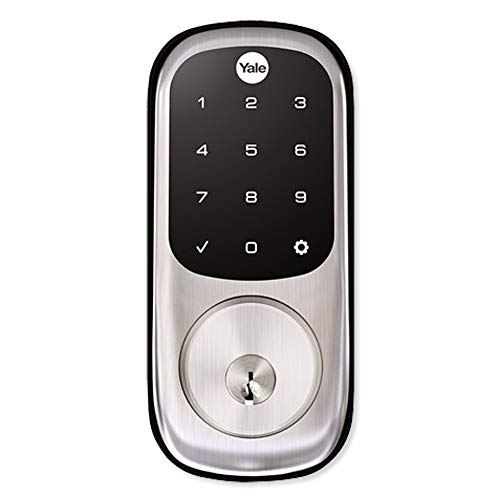
The Yale Assure Lock with Zigbee features a backlit touchscreen keypad for code entry, with Auto Relock and remote locking options. It integrates with Zigbee hubs to enable remote access and control, potentially working with platforms like Xfinity Home when paired with a compatible hub. Users can enable Auto Relock to ensure doors secure automatically after entry. The lock’s compatibility with various Zigbee ecosystems makes it a solid choice for automated entry while maintaining a traditional keypad option.
Security features include a touchscreen keypad and Auto Relock, with remote control via Zigbee hubs. Users should confirm hub compatibility and consider whether they require Auto Relock versus manual control for daily routines.
Kwikset 914 Traditional Keypad SmartCode

The Kwikset 914 SmartCode combines traditional keypad entry with SmartKey Security and Zigbee 3.0 technology. It supports a range of Zigbee hubs, including Echo Plus, SmartThings Hub v3, and other Zigbee 3.0-enabled systems. It offers up to 30 customizable user codes for family and visitors and includes SmartKey Security for quick re-keying and enhanced protection against intruders. Installation considerations include door backset and thickness measurements to ensure compatibility with your door system.
Pros include broad hub compatibility, multiple user codes, and a secure SmartKey option. Users should plan for integration with their preferred hub and consider whether they need extended user code management for household access.
Kwikset Home Connect 620, Z-Wave Smart Lock

The Kwikset Home Connect 620 uses Z-Wave technology to integrate with Ring Alarm, Samsung SmartThings, and other Z-Wave hubs. It provides a fast, quiet motorized deadbolt with an illuminated keypad for keyless entry and one-touch locking. A Z-Wave hub is required to enable home automation and remote control. The model supports Ring app control through compatible hubs, broadening its remote management and alert capabilities.
Considerations include Z-Wave hub requirements, compatibility with Ring or other alarm systems, and ensuring your hub supports Zigbee versus Z-Wave ecosystems. This lock emphasizes smooth entry and smart automation within Z-Wave-based setups.
Aqara U50: Apple Home Key and Matter Ready

The Aqara U50 integrates Apple Home Key and supports Matter via compatible Aqara hubs, enabling broad interoperability with Apple devices and Matter-enabled ecosystems. It offers multiple unlocking methods, including keypad and remotely configurable passwords, with one-time local passwords available when internet is unavailable. The U50 also supports automations with Google, Alexa, and IFTTT, and is designed for cross-system control through Aqara’s Zigbee 3.0 hub. Note that some advanced integrations may require additional Aqara hardware for full functionality.
Highlights include Matter support, Apple Home Key integration, and flexible access options. Users should verify Matter compatibility in their region and ensure their Aqara hub firmware is up to date for optimal performance with third-party services.
Buying Guide: Key Purchase Considerations for Zigbee Locks
- Hub compatibility: Confirm your preferred Zigbee hub supports the lock’s model and the required ecosystems (HomeKit, Google Home, Alexa, IFTTT, Matter).
- Unlock methods: Evaluate whether you want biometrics, keypad codes, Home Key, or remote password options, and ensure the chosen lock supports your preferred method(s).
- Security features: Look for SmartKey or equivalent re-keying protection, anti-tamper indicators, and reliable encryption for digital keys and codes.
- Automation and scenes: Consider how the lock integrates into automations with doorbells, cameras, alarms, and lighting. Check support for local control to minimize cloud dependency.
- Installation fit: Measure backset, bore size, door thickness, and strike type to ensure compatibility with existing doors or conversion kits.
- Power options and reliability: Review battery life, alert options for low power, and the availability of mechanical key overrides for emergencies.
- Remote access and privacy: If you plan remote unlocking, verify how access is granted to guests and the security of temporary passwords or keys.
- Firmware and updates: Ensure devices receive regular firmware updates to address security vulnerabilities and improve stability, especially for Matter and HomeKit support.
When comparing models, map your needs to hub ecosystems, preferred unlock methods, and whether you require a keypad, fingerprint reader, or an Apple-centric key system. For multi-room or multi-user homes, prioritize locks with flexible access codes and robust integration with your central hub. If you already use Aqara or Kwikset hubs, choose a lock that aligns with your current setup to minimize compatibility gaps and maximize automation potential.