
When protecting essential electronics from power outages, a compact but reliable UPS can be a smart choice. This guide highlights five versatile options that balance battery life, surge protection, and user convenience. Each model offers different outlet configurations, battery capacity, and management features to help you pick the right fit for a single essential setup or a small home office. Below you’ll find a quick product overview and in-depth sections for each unit.
| Product | Brand | Outlets | VA / W | Notable Feature |
|---|---|---|---|---|
| BE600M1 Back-UPS | APC | 7 (5 Battery Backup + Surge, 2 Surge Only) | 600 VA / 330 W | USB charger port |
| VL425 / VL425 UPS | SKE SMART KEY ENERGY | 7 (5 backup & surge, 2 surge-only) | 425 VA / 240 W | RJ45 protection and USB-C fast charging |
| BE425M | APC | 6 | 425 VA / 225 W | Right-angle plug; wall-mountable |
| PST5-660MT120 | Liebert | 8 | 660 VA / 400 W | LCD screen; Energy Star; bundled software |
| Amazon Basics 1500VA | Amazon Basics | 10 | 1500 VA / 900 W | Extended runtime; 5 backup + 5 surge |
APC BE600M1 Back-UPS 600VA Review
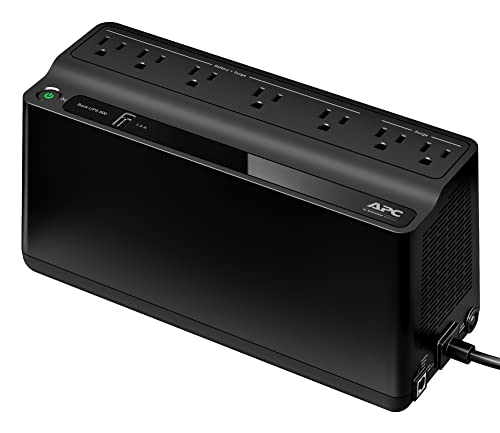
The APC BE600M1 is a compact uninterruptible power supply designed for everyday devices and small home office setups. It provides 600 VA / 330 W of battery-backed power to keep essential equipment running during outages. The unit features seven outlets, including five that offer battery backup with surge protection and two that provide surge protection only. A USB charging port (1.5 A) adds convenient charging for smartphones and small electronics. It is a practical choice for keeping a single PC, monitor, or modem online during short outages without sacrificing performance on other devices.
Key considerations for this model include its modest footprint and straightforward plug-and-play operation. While not designed for high-end gaming rigs or power-hungry workstations, it excels at safeguarding a single workstation or essential peripherals. Users should plan for a few minutes of runtime on a typical load and verify outlet placement to avoid blocking adjacent sockets with bulky plugs.
SKE 425VA UPS Battery Backup & Surge Protector

The SKE 425VA UPS offers a compact solution for protecting essential devices and network gear. With five backup and surge-protected outlets and two additional surge-only ports, it covers a modest home office setup. The included RJ45 port for surge protection, two USB ports, and a Type-C outlet support charging and connectivity for modern devices. An automatic voltage regulation stage helps stabilize power with a simulated sine wave, which can extend device lifespan by reducing voltage fluctuations. While smaller in capacity than larger models, this unit provides reliable protection for routers, modems, and a single computer during outages.
When evaluating this UPS, consider the balanced mix of battery-backed outlets and the value of the USB-C charging option. The simulated sine wave is suitable for general electronics, but high-wattage peripherals may require a higher-capacity model. The compact form factor makes it easy to place on a desk or shelf without crowding power strips.
APC BE425M 425VA Backup Power

The BE425M focuses on essential protection with a compact 425 VA/225 W battery backup. It includes six outlets—four for battery backup and surge protection, and two that offer surge protection only. A notable feature is the right-angle 3-prong plug, which is convenient for tight spaces and wall-mounted setups. While it does not offer user-replaceable batteries, the device supports serviceable battery replacement by qualified technicians, ensuring longer life for budget-conscious buyers seeking a low-profile UPS solution.
Consider this option if you need to maximize table or shelf space while providing reliable power to a single workstation, modem, or router. The right-angle plug and wall-mounting capability can simplify placement in tight rooms, but be mindful of the limited runtime under heavier loads.
Vertiv Liebert PST5 660VA UPS

The Liebert PST5 stands out with eight outlets, combining four battery-backed and surge-protected outlets with four surge-only outlets. It also includes protection for data lines via RJ45 protection, which helps to guard connected network devices from surges. An LCD display provides real-time status and power conditions, aiding quick troubleshooting during outages. This model is a solid choice for users who need reliable protection for a small home office or media setup with multiple devices that require battery backup.
Potential trade-offs include the need to manage convertible outlets to ensure critical devices remain on battery backup during extended outages. The multiline protection makes it suitable for a workstation with a router and a few peripherals, but verify space and outlet distribution in advance.
Amazon Basics 1500VA UPS with 10 Outlets

The Amazon Basics 1500VA model provides a larger battery backup and surge protection solution with ten outlets. It offers a substantial runtime advantage at moderate loads and includes five battery-backed outlets and five surge-protected outlets. The unit is line-interactive, a common choice for users who want continuous power during outages and protection against power fluctuations. A user-friendly interface and a manageable footprint make it suitable for a single workstation, home office, or media setup requiring more outlets and reliable power backup.
Runtime will vary with load, so plan around your essential devices. For a single workstation and a router, this model can provide a meaningful buffer during outages, helping to prevent data loss and equipment resets.
APC BE650G1 Dataline Protection

The BE650G1 combines ample battery-backed power with dataline protection for Ethernet connections. It features 650 VA / 390 W and eight outlets, evenly split between battery-backed and surge-protected outlets. RJ45 dataline protection guards network devices from surges and spikes entering through Ethernet cables. This unit is well-suited for protecting a single computer, router, and modem while safeguarding data lines—an important aspect for home offices relying on networks and cloud-based workflows.
Buying Guide
- Power capacity: Look at VA and wattage ratings. For a single workstation with a monitor and a modem, a 425–600 VA unit can suffice; for a desktop with multiple peripherals, aim higher (800–1500 VA).
- Outlet configuration: Ensure the UPS has enough battery-backed outlets for essential devices and consider how bulky plugs affect accessibility; right-angle plugs and wall-mount options can help.
- Runtime expectations: Runtime scales with load. Estimate your critical load and choose a model that delivers several minutes of runtime for safe shutdown during outages.
- Protection features: Beyond battery backup, assess surge protection, data-line protection (RJ45), and USB charging capabilities for convenience and broadened protection.
- Management interface: LCD screens or software dashboards can provide real-time status, battery health, and event logs, useful for proactive maintenance and downtime prevention.
- Maintenance and replacement: Some models offer serviceable or replaceable batteries, which can extend lifespan and reduce total cost of ownership. Confirm availability of battery replacements in the future.
- Footprint and placement: Consider desk or shelf space, outlet strip layout, and distance to the wall. Slim or wall-mountable designs can save space in small rooms.
- Warranty and support: A longer warranty and responsive customer support can reduce downtime and replacement risks over the unit’s lifetime.
These options provide a spectrum of single-setup protection—from compact, budget-friendly models to higher-capacity units with expanded outlets and data-line protection. When choosing, align the UPS with the critical devices you cannot afford to lose during an outage, and ensure the unit’s runtime is sufficient for your typical power event. For multiple devices or networked workstations, prioritize models with USB-C charging, data-line protection, and clear status monitoring to minimize downtime.