
Finding a reliable PWM fan controller helps maintain quiet, efficient cooling for gaming rigs, workstations, and DIY builds. This guide reviews top 5 options designed for 4-pin PWM fans, hub capabilities, and temperature-aware control. Each product offers unique strengths—from compact inline controllers to multi-fan hubs with SATA power. Below, you’ll discover practical choices for different setups, whether you want direct motherboard integration, stand-alone speed control, or expanded fan header capacity.
Product Summary
- Noctua NA-FC1: Compact, flexible 4-pin PWM control with a “No stop” mode for safe minimum speeds.
- OwlTree 4 Pin 12V PWM Hub (6 Fans): High-capacity fan hub with 60W total output and dual power inputs.
- IS ICSTATION PWM Controller: Temperature-based automatic/manual control with a clear RPM display.
- OwlTree Type-C Powered Hub (4 Pin 5 Way Splitter): USB-C power input with PWM output and compatibility for multiple fans.
- ARCTIC Case Fan Hub: Synchronous PWM distribution and expanded slots for up to 9 additional fans.
Noctua NA-FC1 4-Pin PWM Fan Controller

The Noctua NA-FC1 is a compact, highly flexible controller designed for 4-pin PWM fans. It can function as a manual speed reducer or operate in tandem with motherboard-based automatic control to achieve quiet operation even with high-speed PWM fans. A standout feature is the “No stop” mode, which prevents the fan from dropping below 300 rpm, reducing BIOS fan-related errors. This makes it a strong choice for users who want reliable, quiet cooling without BIOS-based hiccups.
OwlTree 4 Pin 12V PWM Fan Controller Hub (6 Fans)

This 6-fan PWM hub supports four-pin fans and uses both SATA and DC 5525 power inputs to deliver up to 60W total (5A at 12V). Each port can carry up to 2A, enabling multiple fans to run in sync. It is suitable for builds needing expanded fan control with flexible power options, though users should ensure all fans stay within the combined power limit to avoid overload. It’s a practical solution when additional headers are scarce on the motherboard.
IS ICSTATION PWM Temperature Controller

The ICSTATION module offers 4-wire PWM speed control with a temperature probe and a digital display showing temperature in Celsius and RPM. It supports automatic or manual modes, balancing energy efficiency with cooling performance. The display uses RPM in unit steps of 100, enabling clear monitoring for high-RPM fans. The dual-mode system is well-suited for users who want intelligent cooling with the option to override automation for specific scenarios.
OwlTree 4 Pin PWM Hub with Type-C Power

This fan speed controller uses a Type-C input for 5V power and provides a 12V output to a 4-pin PWM fan. It includes a 4-pin 5-way hub, enabling multiple fans to run concurrently. The PWM regulation is achieved through an internal DC-DC boost circuit that converts 5V input to 12V for the fans. It supports 0-100% PWM duty cycles, with a total power limit tied to the power supply’s 5V capability. It’s a flexible option for USB-powered DIY cooling setups.
ARCTIC Case Fan Hub – 10-Fold PWM Distributor
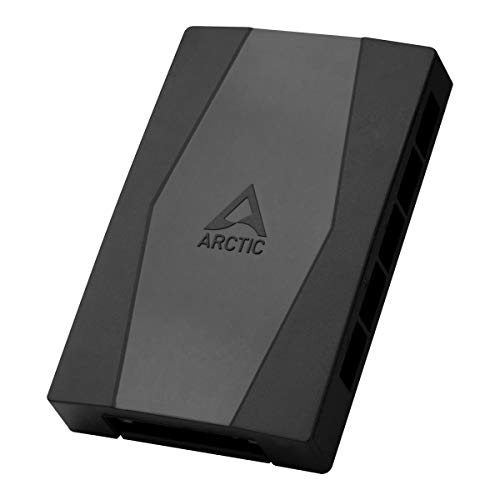
The ARCTIC Case Fan Hub offers a high-density solution with 10 PWM fan connections and a SATA-powered supply. It enables synchronous control by passing the PWM signal from the motherboard to all connected fans, ensuring uniform RPM across the lineup. The hub also returns RPM readings to the system, aiding monitoring. This option is ideal for builds requiring large-scale, coordinated cooling with minimal motherboard header usage.
OwlTree 12V 4 Pin PWM Hub with USB-C Power

Designed to support six PWM fans with a Type-C PD/QC input and DC 5521 compatibility, this hub mirrors the same 60W total power ceiling as other multi-fan controllers. It offers per-port current limits and a flexible power option, making it suitable for compact builds that still require robust fan control. The Type-C input is convenient for modern power sources, provided the supply can meet the total wattage requirements.
ASUS TUF Gaming ARGB PWM Fan Hub

The ASUS TUF Gaming ARGB PWM Fan Hub connects up to six fans and includes RGB synchronization along with PWM control. It features visible power and operation indicators for quick status checks and supports stable dual SATA power supply. This hub is a strong choice for users who want coordinated cooling and lighting, particularly in gaming builds where aesthetics meet performance.
Noctua NA-FH1 8-Channel Fan Hub

The Noctua NA-FH1 provides eight channels for power, control, and monitoring, compatible with 4-pin PWM and 3-pin fans. It forwards PWM signals from a motherboard or the NA-FC1 hub to all connected fans and includes safety fuses for overcurrent and short-circuit protection. It supports up to 54W via SATA for 12V fans and 24W via the 4-pin interface, making it a robust solution for large cases with multiple fans.
Buying Guide: Key Purchase Considerations
- Power capacity: Check total wattage and per-port limits to ensure all fans run at your desired speeds without overloading the hub or controller.
- Compatibility: Confirm support for 4-pin PWM, 3-pin options, and whether SATA or DC power is required or preferred for your build.
- Control type: Decide between motherboard-driven PWM control, standalone manual control, or temperature-based automatic control for dynamic cooling.
- Expandability: If you plan to add more fans, choose hubs with higher port counts and robust signal distribution to avoid desynchronization.
- Monitoring features: Digital displays, RPM readouts, and RGB integration can aid management, but ensure they do not complicate installation.
- Safety features: Fuses or overcurrent protection help prevent damage from short circuits or power spikes.
- Ease of installation: Some hubs are plug-and-play with multiple power inputs; others may require additional cables or adapters. Plan cable routing accordingly.
- Future-proofing: If you anticipate upgrades to your cooling system, select modules that support higher fan counts and newer power standards (e.g., USB-C power inputs or richer PWM control).