
Klipper firmware has become a popular choice for hobbyists and professionals seeking smoother motion, faster prints, and improved calibration. This guide highlights five top-rated Klipper-enabled printers and accessories that help you unlock reliable high-speed performance, accurate auto-leveling, and easy setup. Each pick balances speed, precision, and user-friendliness to support a range of printing needs—from rapid prototyping to detailed models.
| Product | Brand | Approx. Build Volume | Key Klipper Feature |
|---|---|---|---|
| ELEGOO Neptune 4 Pro | ELEGOO | 225×225×265 mm | Klipper firmware with fast 500 mm/s printing and upgraded rails |
| IR3 V2 Conveyor Belt 3D Printer | IdeaFormer-3D | 250×250×∞ mm (endless Z) belt system | Auto-leveling and one-click calibration with continuous Z printing |
| Sonic Pad Klipper | Creality | N/A (pad accessory) | Klipper control with input shaping to boost high-speed print quality |
| QIDI MAX3 3D Printer | R QIDI TECHNOLOGY | 325×325×315 mm | Klipper firmware with CoreXY for high-speed, auto leveling |
| BIGTREETECH Pad 7 | BIQU | N/A (control pad) | Pre-installed Klipper with advanced input shaping and strong computing |
ELEGOO Neptune 4 Pro 3D Printer

The ELEGOO Neptune 4 Pro applies Klipper firmware to deliver high-speed printing up to 500 mm/s, paired with a robust all-metal guide rail upgrade for the X and Y axes. Its segmented heated zones reduce power usage and improve heating efficiency. The printer’s auto-leveling support and direct drive extruder offer improved print consistency, especially for fast moves. Build volume is 225×225×265 mm, making it suitable for a wide range of filament types and quick prototyping cycles. This model emphasizes precision at high speeds while maintaining manageable assembly and operation.
IdeaFormer-3D IR3 V2 Conveyor Belt 3D Printer
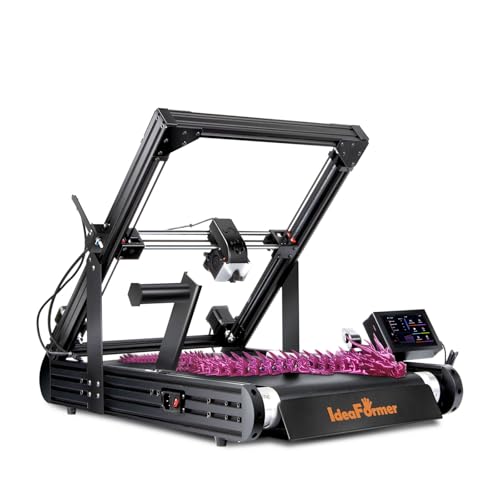
The IR3 V2 introduces a rolling conveyor belt design with endless printing along the Z-axis, enabling large-scale or continuous batch production. Its upgraded metal conveyor belt delivers strong layer adhesion for a range of filaments including PLA, PETG, and ABS. Auto-leveling with a Y-offset sensor eliminates manual bed calibration, simplifying setup. The system is designed for long prints and easy high-throughput workflows, appealing to users pursuing large parts or repetitive manufacturing tasks.
Creality Sonic Pad Klipper

The Creality Sonic Pad on Klipper provides a dedicated 7-inch touch screen with a powerful 64-bit platform to run Klipper firmware. It improves high-speed printing by applying precise motion control and the input shaping feature to dampen vibrations, reducing ringing and artifacts. The Sonic Pad is broadly compatible with many Ender-series printers and can be updated OTA, enabling users to push Klipper features across a diverse fleet. This accessory emphasizes speed-friendly control and easy integration.
QIDI MAX3 3D Printer

The QIDI MAX3 combines a large 325×325×315 mm build area with Klipper firmware for rapid, precise printing. Its CoreXY architecture enhances speed without sacrificing stability, and auto-leveling adds convenience for repeated use. The printer supports a broad material range, including tougher filaments, with a focus on professional-grade reliability for higher throughput projects. This model targets users who need a balance of speed, volume, and print quality.
BIGTREETECH Pad 7 Klipper Touch Screen

The BIGTREETECH Pad 7 Klipper touchscreen integrates pre-installed Klipper firmware with input shaping and a robust CB1-based compute platform. It enhances high-speed printing by providing precise control, easy G-code preview, and OTA upgrades. The Pad 7 is designed to work with a wide range of printers, enabling quick Klipper adoption across an existing setup. A convenient upgrade for users seeking improved motion control and a centralized interface.
BIGTREETECH ADXL345 V2.0 Accelerometer Board

The ADXL345 V2 accelerometer supports Klipper input shaping by measuring resonance frequencies to minimize print ripples at high speeds. It connects via USB to compatible boards or Raspberry Pi setups, providing more accurate, repeatable results for faster prints. Its flexible mounting and USB compatibility make it a practical upgrade for users aiming to optimize Klipper performance across multiple machines.
Buying Guide: Klipper-Driven Printing Considerations
- Print speed vs. quality: Klipper enables higher feed rates with controlled acceleration and motion shaping. Assess whether you truly need ultra-fast speeds or if a balance of speed and precision is preferable for your projects.
- Bed leveling and calibration: Auto-leveling features reduce manual setup time. Consider printers or accessories with reliable leveling, especially for frequent print changes or complex geometries.
- Build volume: Larger beds enable bigger parts but may require sturdier frames and more robust cooling. Choose a size that fits your typical projects and workspace.
- Compatibility: Ensure firmware and hardware compatibility with your existing printers. Klipper generally supports a wide range of boards, sensors, and control interfaces, but verification is important for stability.
- Hardware upgrades: Upgrades such as advanced belts, linear rails, or accelerometers can improve speed and quality. Consider future-proofing by selecting printers and pads with proven upgrade paths.
- Community and support: A strong user community helps with configuration, troubleshooting, and sharing profiles for various filaments and models.
- Maintenance and reliability: High-speed printing may demand robust components (fans, heatsinks, drive belts). Prioritize machines with durable parts and accessible maintenance.
- Software workflow: Klipper performance often relies on good slicing settings and host computer performance. Plan for compatible slicers and processing capabilities in your setup.