
Protect your essential devices from unexpected outages with a reliable battery backup. This guide compares top-rated UPS systems, designed to keep computers, routers, and other electronics running when the power goes out or voltage fluctuates. Each model below offers a mix of battery runtime, surge protection, and manageability features to fit home office, gaming, and small-business setups.
| Product | Brand | Capacity | Key Benefit |
|---|---|---|---|
| BE600M1 | APC | 600 VA / 330 W | Compact, USB charging, multiple outlets |
| BX1500M | APC | 1500 VA / 900 W | Higher runtime for multi-device setups |
| BE425M | APC | 425 VA / 225 W | Smaller footprint, wall-mountable |
| CP1500PFCLCD | CyberPower | 1500 VA / 1000 W | Pure sine wave, LCD, USB-C |
| GOLDENMATE 1000VA | GOLDENMATE | 1000 VA / 800 W | LiFePO4 battery, long lifespan |
APC BE600M1 600VA Backup Power
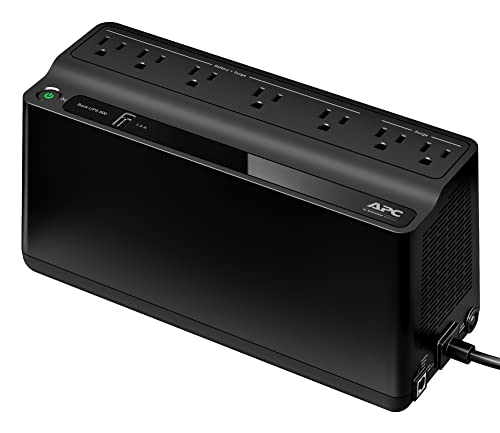
Overview: The BE600M1 provides 600 VA / 330 W of backup power with seven outlets, including five that offer battery backup and surge protection, and two that provide surge protection only. It includes a USB charger port for mobile devices, making it a solid choice for small setups requiring basic protection and a ready phone charge during outages.
What to know
Best suited for a single workstation or a small home office, this model emphasizes compact size with essential battery backup. The USB charging port adds convenience for smartphones, tablets, and other USB devices. While it doesn’t offer extensive runtime for high-power devices, its balance of price, size, and features makes it a popular starter UPS for basic electronics protection.
APC BX1500M 1500VA UPS

Overview: The BX1500M delivers 1500 VA / 900 W of backup power with ten outlets offering a mix of battery-backed and surge-protected ports. It supports larger setups, such as a PC with multiple monitors and a router. It also features PowerChute UPS management via a data port for Windows and macOS energy settings, helping you orchestrate graceful shutdowns and monitoring.
What to know
Ideal for workers or enthusiasts with multiple peripherals. Higher runtime and more outlets help safeguard a broader array of devices, including network gear. The included management software aids in automating power-down routines, preserving work during outages and reducing data loss risk.
APC BE425M 425VA Battery Backup

Overview: The BE425M provides 425 VA / 225 W of backup power with six outlets, four of which are battery-backed and two for surge protection only. It ships with a five-foot power cord and a right-angle wall plug, and includes wall-mounting options. Battery replacement is not user-serviceable, but service replacements are available through technicians.
What to know
Best for compact desks or media centers where space is limited. This unit covers essential devices like a modem, router, small PC, and a few peripherals. The smaller form factor helps conserve desk space while still delivering backup and surge protection.
CyberPower CP1500PFCLCD PFC Sinewave UPS

Overview: The CP1500PFCLCD offers 1500 VA / 1000 W with 12 outlets, split evenly between battery backup and surge protection. It uses a pure sine wave output to support active PFC power supplies and sensitive devices, provides two USB ports for charging, and features a color LCD panel that presents real-time battery and power information, enabling proactive maintenance and alerts.
What to know
Best for desktops with multiple peripherals, gaming rigs, or workstations requiring clean power and reliable shutdown software. The LCD readout helps technicians and users quickly assess battery health and system status, reducing downtime risk during outages.
GOLDENMATE 1000VA Lithium UPS

Overview: This lithium-based UPS uses LiFePO4 batteries, delivering 1000 VA / 800 W with eight outlets featuring both battery backup and surge protection. It advertises a lifespan of more than 10 years and over 5000 charge cycles, with a built-in Battery Management System and cooling considerations to maintain performance. The unit emphasizes a long-term cost of ownership and reliable backup for critical devices.
What to know
Best for long-term power reliability and devices that benefit from a more durable lithium battery. The higher upfront technology may yield fewer battery replacements over time, but potential higher upfront cost should be weighed against long-term savings and endurance.
Buying Guide: Key Purchase Considerations
When choosing a battery backup, consider capacity in VA and watts relative to your devices, runtime needs, and outlet distribution. A higher VA rating generally provides longer backup time, but real-world runtime varies with load. For home offices with multiple devices, prioritize models with multiple battery-backed outlets and properly protected data lines.
- Runtime vs. Load: Estimate total wattage of essential devices and choose a UPS that can sustain them for a reasonable period during an outage.
- Clean Power Output: If you use sensitive equipment or power-hungry devices, prefer a UPS with a pure sine wave output.
- Management Features: LCD displays, automatic shutdown software, and data-line protection improve usability and safety for workstations and servers.
- Battery Type and Lifespan: Lead-acid units are common and affordable; lithium-based UPSs offer longer lifespans and lighter weight but may have higher upfront costs.
- Expandability and Outlets: Assess how many outlets you need and whether you require a mix of battery-backed and surge-only ports for peripherals like printers or scanners.
- Maintenance: Some batteries are service-replaceable, whereas others require technician replacement. Consider warranty terms and service options.
For typical home office setups, a 600–1500 VA UPS with a mix of battery-backed outlets and a few surge-only ports often delivers the best balance of protection, runtime, and cost. For gaming rigs or workstations with multiple displays, a higher-capacity model with robust management features may be preferable. In environments with longer outages, lithium-based units offer extended longevity and fewer replacements, though price considerations apply.