
Finding the right stand for a 3D printer is about balancing stability, storage, and workflow efficiency. The right unit should securely support your printer, keep spools organized, and power devices where needed. Below is a curated selection of stands that combine sturdy construction with ample filament storage and convenient power options. The table provides quick comparisons to help you choose the best fit for your workspace.
| Product | Brand | Key Feature |
|---|---|---|
| AHOWPD 3D Printer Table (Black) | AHOWPD | Spacious top, built-in power strip, dual spool storage |
| Homieasy Printer Stand with Charging Station | Homieasy | Large top, 4-tier storage, heavy-duty steel frame |
| MILEFA 3D Printer Table with Filament Storage | MILEFA | Two work surfaces, up to 80 spool capacity, adjustable top |
| HavenlyYouth 3D Printer Stand | HavenlyYouth | All-in-one with charging station, large capacity |
| AHOWPD 3D Printer Table with Wheels | AHOWPD | Wheeled design, drawer, two power outlets |
AHOWPD Black 3D Printer Table With Filament Storage

Designed for organization and efficiency, this stand features a spacious tabletop to securely hold your 3D printer while offering ample storage for filament spools, accessories, and parts. A built-in power strip includes 2 AC outlets and 2 USB ports, enabling easy connection of multiple devices. The 140 cm power cord provides flexible placement. The stand includes two levels of filament storage with metal tube racks on the middle and bottom shelves, backed by a sturdy metal frame for long-lasting durability.
Homieasy Printer Stand With Charging Station
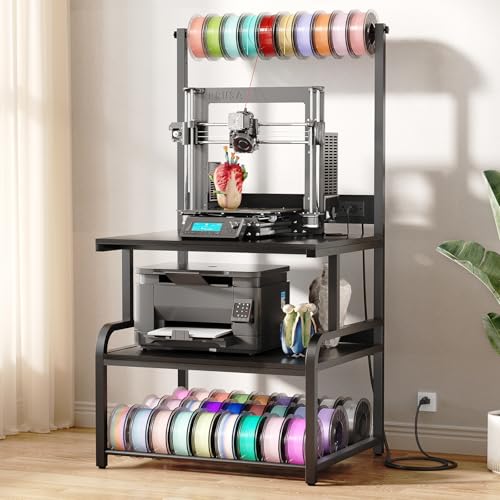
This large printer stand supports two printers and includes a high-capacity filament storage system. The top shelf is generous enough for standard printers, while the middle shelf accommodates one printer and the lower tube rack holds multiple spools. Built with a heavy-duty steel frame and coated particleboard, it resists rust and wear, supporting up to 300 lbs and minimizing vibration during operation. The design prioritizes space efficiency for busy studios and workshops.
MILEFA Double-Workspace 3D Printer Table
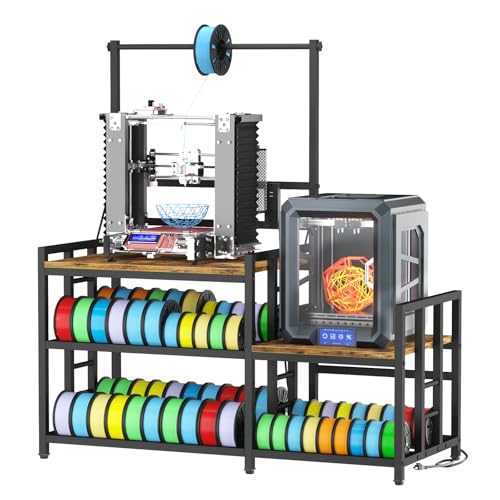
This heavy-duty stand provides two large work surfaces designed to securely accommodate most printers. It doubles as a high-capacity filament storage rack with a three-tier shelving system that can hold up to 80 spools. An adjustable top crossbar and shelf heights offer flexible filament handling and quick access, while the middle shelf can adapt to small printers or 3D prints, enhancing workflow efficiency in professional settings.
HavenlyYouth Large 3D Printer Stand With Filament Storage

This all-in-one design combines a top shelf for large printers, filament spool rack, and two bottom shelves for storage. The included charging station supplies 2 AC outlets and 2 USB ports to power printers, computers, or phones. The large footprint supports substantial equipment and accessories, with ample space to keep workflows organized and efficient in garages, studios, or offices.
AHOWPD Wheels-Equipped 3D Printer Table With Drawer

This wheeled model adds mobility to a robust storage solution, featuring a drawer for small accessories and a built-in power strip. The sturdy metal frame supports heavy workloads and keeps tools, spools, and devices within reach. The integrated wheels simplify repositioning within a workspace, which is beneficial for collaborative studios or changing layouts.
AHOWPD Filament Storage Rolling Stand (Alternate)
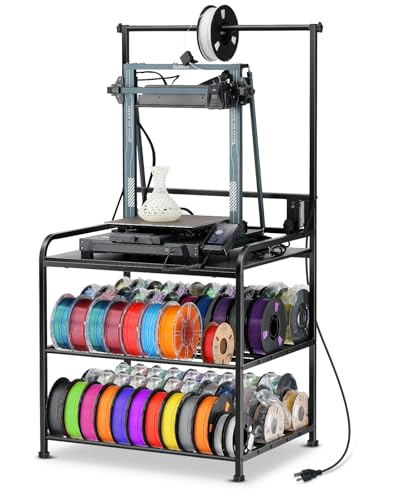
All-in-One rolling stand with a top surface for printers and a comprehensive filament storage area. The rack can hold up to 60 spools, with internal compartments designed to keep PLA, ABS, PETG, and other materials organized. Built for durability, this option emphasizes space optimization and mobility for dynamic workspaces.
Buying Guide: Key Purchase Considerations
- Printer compatibility: Check top dimensions and weight capacity to ensure your specific 3D printer fits securely without wobble.
- Filament storage capacity: Consider how many spools you use regularly. If you print with multiple materials, a rack that holds 60+ spools can keep your workflow uninterrupted.
- Power needs: Built-in power strips and USB ports are valuable for reducing cable clutter. Ensure outlets are sufficient for your printers, cameras, and other peripherals.
- Sturdiness and materials: Aluminum or steel frames with reinforced shelves provide better stiffness and longevity, especially for vibration-prone FDM printers.
- Mobility vs. stationary: Wheels offer mobility for reconfiguring spaces; however, fixed stands can offer greater stability in compact setups.
- Cable management: Integrated cable channels or routing features help keep cords tidy and reduce tripping risks.
- Expandability: Some designs offer adjustable shelves, removable top panels, or modular components to grow with your lab or workshop.
- Assembly and maintenance: Look for user-friendly assembly, clear instructions, and accessible parts for future maintenance or upgrades.
When evaluating options, prioritize designs that maximize both stability and accessibility. For mixed-use studios, a two-pronged approach—one top surface for the printer and a robust filament storage system—often yields the best balance between efficiency and organization.