
Answering the search intent for a compact, capable desktop CNC mill, these five options balance price, usability, and capability for DIY makers. They suit beginners seeking easy setup and software workflow, and advanced hobbyists pursuing multi-axis projects. Each pick targets different needs—from basic carving to four-axis machining and precise PCB work. The table below helps compare core specs at a glance.
| Product | Best For | Key Feature | Rotary/4th Axis |
|---|---|---|---|
| Carvera Air Desktop CNC Machine (4th Axis) | Multi-axis hobbyists, 3D engraving | Quick tool changer, closed-loop control | Optional 4th Axis |
| Genmitsu Cubiko CNC Router | Beginner to intermediate, plug-and-carve | Automatic tool height adjustment | No |
| TTC3018 Pro CNC Router Machine | Compact, budget-friendly projects | All-metal Z-axis, 0.1mm precision | No |
| Genmitsu 3018-PRO (GRBL) Router Kit | Entry-level learners, simple materials | Grbl control, offline capabilities | No |
| AnoleX 4030-Evo Ultra | Metal and precision work, robust build | Dual linear rails, ball screws | Optional 4th axis (via GRBL 1.3a) |
Carvera Air Desktop CNC Machine with Makera CAM
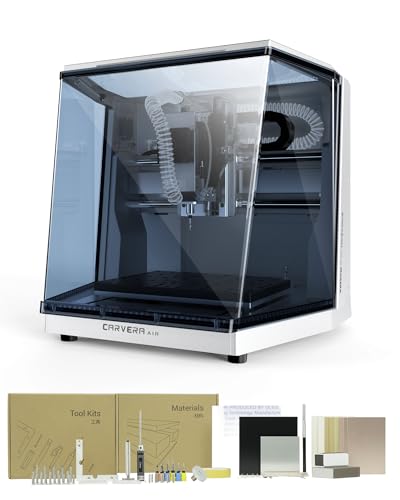
Best for flexible hobbyists who want a contained, enclosed milling environment with quick tool changes. The Carvera Air supports detailed work in metal, wood, and electronics components via Makera CAM. It is well suited for prototyping, custom parts, and jewelry projects where safety and noise containment matter in a home workshop. The optional 4th axis expands opportunities for cylindrical and 3D objects, while a closed-loop control helps maintain accuracy during longer runs.
Who this is for: makers who value a compact footprint, integrated software, and the ability to switch tools rapidly for multi-step tasks. A potential limitation is the need to rely on Makera CAM for full workflow integration if you prefer other CAD/CAM ecosystems.
Best for: small shops and desktops where noise, safety, and quick setup are priorities. Choose this if you want a turnkey experience with a strong software pairing and optional 4th axis for advanced projects.
Genmitsu Cubiko CNC Router Machine
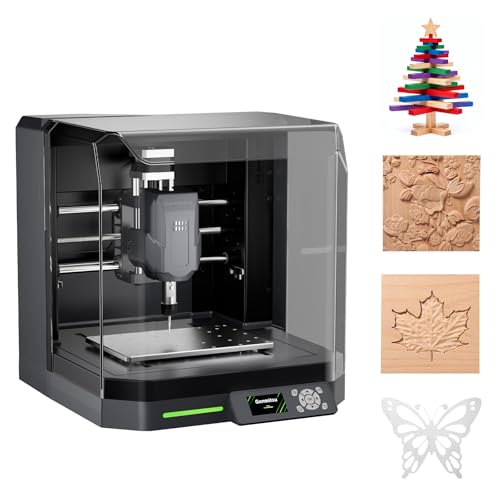
This machine is ideal for beginners who want plug-and-play operation and practical software integration. It comes ready-to-use out of the box and supports Genmitsu App, Fusion 360, Easel, Candle, and Carveco workflows. An automatic tool height adjustment feature reduces setup steps, and smart surface adjustment helps achieve smoother engraving on imperfect surfaces. It’s best for learning, smaller projects, and simple wood or PC materials, with the caveat that heavier metal work may require a more rigid setup.
Best for: learners and classrooms or makerspaces seeking easy start-up and guided tutorials. Better for: wood, acrylic, and soft metals at a hobbyist pace. Avoid if: you need heavy-duty metal machining or continuous high-speed milling on hard alloys.
TTC3018 Pro CNC Router Machine

The TTC3018 Pro emphasizes all-metal Z-axis with high precision and stable framing for ner work in wood, acrylic, and small metal sheets. With an upgraded 0.1mm positioning accuracy and a compact footprint at 15 pounds, it’s suited for educational settings and makers who need a portable, reliable machine for precise engraving and carving. The built-in wireless and USB options provide flexible file transfer, though it remains a desktop unit best used for light to moderate materials.
Best for: students and makers who need a compact, precise machine. Choose this if you want solid Z-axis stability and offline capability. Caveat: tree-intensive aluminum work or very large projects may exceed its working area.
Genmitsu CNC 3018-PRO Router Kit

The 3018-PRO is a widely adopted entry-level kit for beginners, featuring GRBL control and a design that simplifies assembly. It supports cutting a range of plastics, soft metals, wood, acrylics, and PCBs and can run with carpeco maker CAM tools. An upgraded power adapter and an out-of-the-box 20,000 RPM spindle speed maximize efficiency for small projects. It remains a good starter option for learning G-code and basic CNC workflows.
Best for: beginners learning CNC fundamentals and small woodworking or PCB projects. Choose this if you want a low-cost, versatile start. Avoid if: you anticipate demanding metal machining or large-format parts soon.
AnoleX CNC Router Machine 4030-Evo Ultra

The AnoleX 4030-Evo Ultra emphasizes precision with dual linear rails and ball screws, plus a robust 800W trim router. It features GRBL_ESP32 firmware for advanced control, including potential for laser engraving and a 4th axis, and supports closed-loop stepper motors. This is a strong option for users who need higher rigidity and precise material removal for metal, aluminum, and hard plastics, within a compact desktop footprint.
Best for: metal and high-precision woodworking enthusiasts. Choose this if you want improved rigidity and future 4th-axis capability. Caution: more advanced users should confirm software compatibility with their CAD/CAM workflow.
Buying Guide: Desktop CNC Mill Essentials
What should I consider before buying a desktop CNC mill?
Project scope, materials, and required precision determine the right machine. Consider working area, spindle power, and axis count. A larger work area helps with bigger prototypes, while higher spindle RPMs benefit detailed engraving on plastics and soft metals.
How important is software and ecosystem?
Software compatibility guides workflow efficiency. Machines with CAM software, intuitive interfaces, and offline controllers reduce setup time. If you already use Fusion 360, Easel, or Carveco, pick a model that integrates smoothly with those tools.
Should I choose a model with a 4th axis?
A 4th axis enables cylindrical machining and complex 3D shapes. It expands capabilities for jewelry, gears, and ornate parts. If your projects rarely require rotation, a 3-axis machine can be more cost-efficient and easier to learn.
Is enclosure important for home workshops?
Enclosures reduce noise, contain chips, and enhance safety in shared spaces. They are particularly beneficial for beginners or environments with children or pets nearby.
What materials and projects are feasible?
3-axis models handle wood, plastics, PCB materials, and soft metals. All-metal Z-axis or high-precision platforms support aluminum and brass with stability. For regular metal cutting, ensure rigidity and appropriate tooling beyond basic hobby use.
Warranty and support considerations
Look for accessible tutorials, community forums, and manufacturer guidance. While specifications matter, the availability of troubleshooting resources influences long-term success for beginners.
FAQ
- What is a desktop CNC mill best used for? Prototyping, engraving, and small-scale manufacturing of parts in wood, plastic, PCB materials, and soft metals.
- Do I need a 4th axis? It enables cylindrical machining and 3D shapes. It is beneficial for advanced multi-axis projects but not essential for basic carving.
- Can these machines cut metal? Some models support light metal work with rigid builds and appropriate tooling; others are optimized for wood and plastics. Check spindle power and rigidity for metal tasks.
- Is an enclosure necessary? Not strictly necessary, but it helps with safety and dust control, especially in shared or home environments.
- Do these machines require assembly? Many beginner kits arrive pre-assembled or require minimal setup. Some models emphasize plug-and-play usability.
- What software should I learn? Common options include Fusion 360, Easel, Candle, Carveco, and GRBL-based control. Pick a model with compatible CAM tools that match your workflow.